10 min read
AWS Emulator Has No UI, So I Gave It One
AWS Emulator ships without a UI. How I made StackPort, an open-source web console for local AWS emulators, work with it, and what it found in my own code.
- aws
- stackport
- opensource
- python
On November 11, AWS released AWS Emulator: one program on your machine that answers the AWS APIs, so your code can create queues, buckets and Lambda functions without an account or a bill. Its README is clear about one thing it doesn't do:
The emulator is a local program that serves an AWS API endpoint. It has no graphical interface.
It went straight to the front page of Hacker News. Less than half an hour in, someone asked: "ok who's gonna build the GUI / web console on top of it?" Someone else replied: "For what? Use the APIs." The next day, the creator of MiniStack, the emulator StackPort was born from, answered: "StackPort ;)"
StackPort is the open-source web console I maintain for local AWS emulators. I started it as a pull request to MiniStack. There was one problem with that answer: StackPort had never talked to AWS Emulator.
So I pointed the latest release at it. Of the 14 screens I checked, 3 opened. "Test connection" said the endpoint was unhealthy. The dashboard took 57 seconds to load.
Two days and five releases later, the same dashboard looked like this:
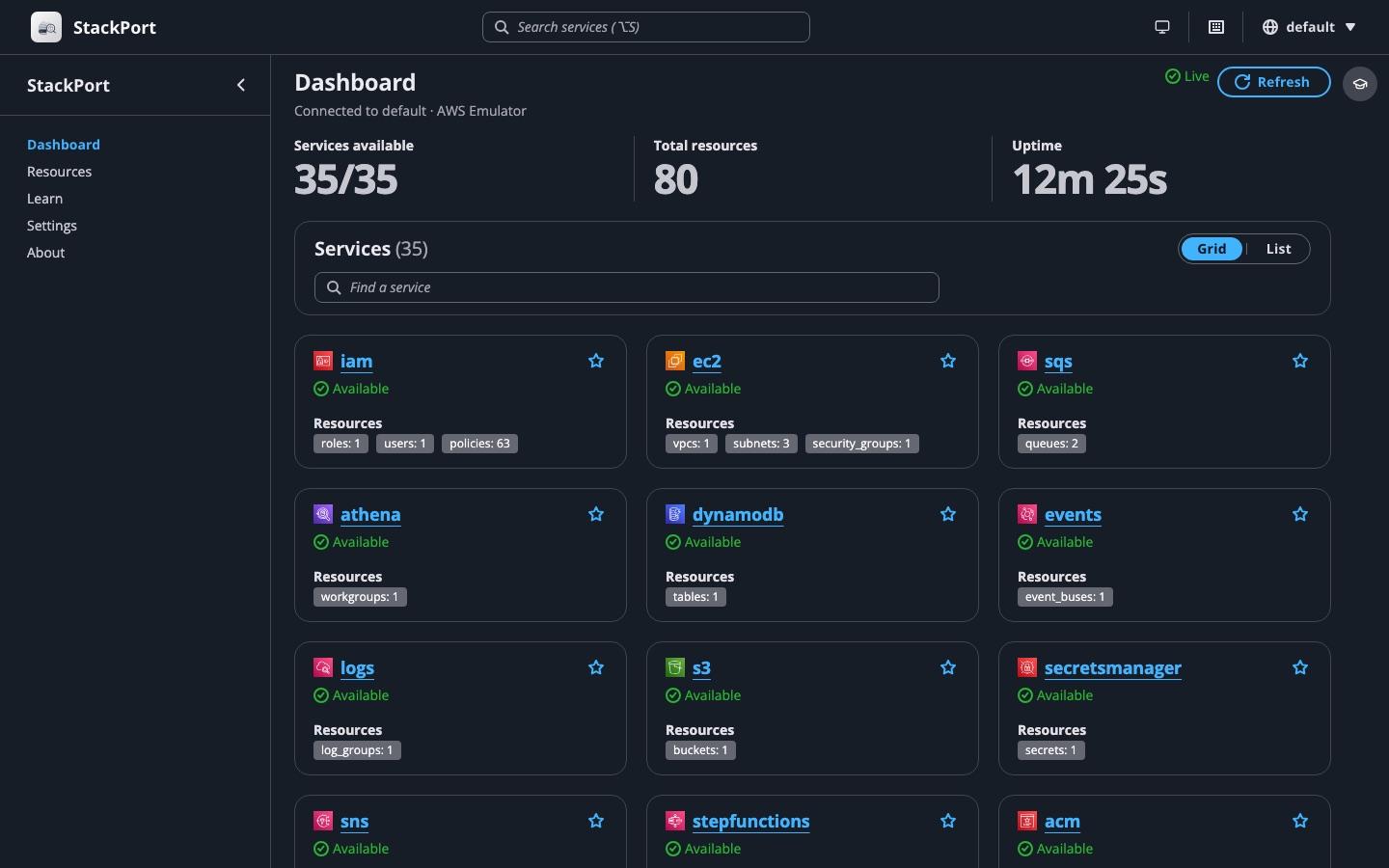 StackPort connected to AWS Emulator on November 13.
This is what happened in between.
"For what? Use the APIs."
It's a fair question, and the answer is the reason StackPort exists. The API is how your code talks to AWS. A console is how you check what your code did. When a test fails because a message never showed up, I don't want to write a script that lists the queues and peeks at the messages. I want to look.
Emulators make AWS cheap to run on your machine. They don't make it visible. AWS Emulator turned out to be the strictest one I've pointed StackPort at, and that was the interesting part.
The emulator wasn't the problem
Before writing any code, I checked whether the emulator could even answer StackPort. I listed every distinct boto3 call StackPort makes, 244 of them, and looked each one up in the emulator: all implemented, none a stub.
So the 11 broken screens were StackPort's fault. More precisely, they were the fault of habits that other emulators let me get away with. Most local emulators accept any access key over plain HTTP. AWS Emulator behaves a lot more like AWS:
- it serves HTTPS only, on
127.0.0.1:9297, with a self-signed certificate it creates on every start; - it checks every signature, against keys it also creates on every start;
- it refuses requests from web pages on other sites.
Each of those broke something. Try to get one request through:
1. Browsers aren't welcome
This is the rule that decides what a UI for AWS Emulator can look like. It's in the emulator's source, with a comment that explains it better than I can:
Refuses a request a browser sent from another site (its
OriginorSec-Fetch-Sitesays so), before authentication, so a web page the developer visits cannot drive the emulator, even an operation served unsigned. SDKs and CLIs send neither header.
The refusal is a 403 that says "Requests a browser sends from another site are refused". So a console that runs only in the browser, calling the emulator with the JavaScript SDK, can't work. A console with a backend can: StackPort's server calls the emulator with boto3, and the browser only ever talks to StackPort.
StackPort already worked that way, except in one place. "Download code" on a Lambda function sent the browser to the presigned URL that GetFunction returns. The browser doesn't trust the emulator's certificate, and the emulator refuses requests from other sites anyway. StackPort now fetches the code itself and streams it to the browser.
2. A certificate for localhost only
The certificate covers localhost, 127.0.0.1 and ::1, and it's new on every start. Python refuses it until you hand it the emulator's ca.pem, which the emulator writes to ~/.aws/emulator/9297/.
Docker made it worse. In Docker Compose, containers reach each other by service name, so StackPort would call https://aws-emulator:9297, and that name isn't on the certificate (aws-emulator#23). StackPort's Compose example sidesteps it: StackPort joins the emulator's network (network_mode: "service:aws-emulator"), so for StackPort the emulator is 127.0.0.1.
There was one more trap. The obvious fix, setting AWS_CA_BUNDLE for the whole process, replaces the system's trusted certificates. A real AWS endpoint configured next to the emulator would then stop trusting AWS. So in StackPort the CA bundle is a setting of each endpoint.
3. Keys that change on every start
StackPort caches its boto3 clients, which is normally a good idea, because building a client is slow. With AWS Emulator, it meant that after you restarted the emulator, StackPort kept signing with the previous run's keys. Every call came back with "Sign the request with the emulator credentials" until you restarted StackPort too.
Now StackPort reads the keys and the certificate straight from ~/.aws/emulator/<port>/, and the files' stat stamp (modification time, size and inode) is part of the client cache key. A restart writes new files, the stamp changes, and the next request builds a fresh client. There's nothing to paste and nothing to restart.
4. Hosts that don't exist
A few AWS operations go to a different host than the rest of their service. botocore sends Cloud Map's DiscoverInstances to data-<host> and Step Functions' StartSyncExecution to sync-<host>. On AWS those hosts exist. On your machine, data-127.0.0.1 doesn't. AWS's guide turns these host prefixes off for the AWS CLI and boto3 with AWS_DISABLE_HOST_PREFIX_INJECTION=true. StackPort now does the same, for local endpoints only, so clients for real AWS are built exactly as before.
5. A 16 MiB ceiling
An S3 PutObject of 16 MiB or more comes back as a 413 (aws-emulator#67). StackPort now uploads files of 8 MiB or more in 8 MiB parts, with a multipart upload, which works on every emulator and on AWS.
Errors that say what to do
The worst part of that first run wasn't the failures. It was that they all looked the same. A service the emulator doesn't implement, a certificate StackPort doesn't trust and a missing key all showed up as "Available, 0 resources", or as a generic 500.
StackPort now sorts failures into a few kinds (not implemented, credentials, permission, TLS, unreachable) and answers each with its own status and a hint about what to change. An operation the emulator answers with NotImplemented reads "Not supported by this endpoint". A stopped emulator shows up in seconds instead of about 40, because local endpoints get a short connect timeout and no retries.
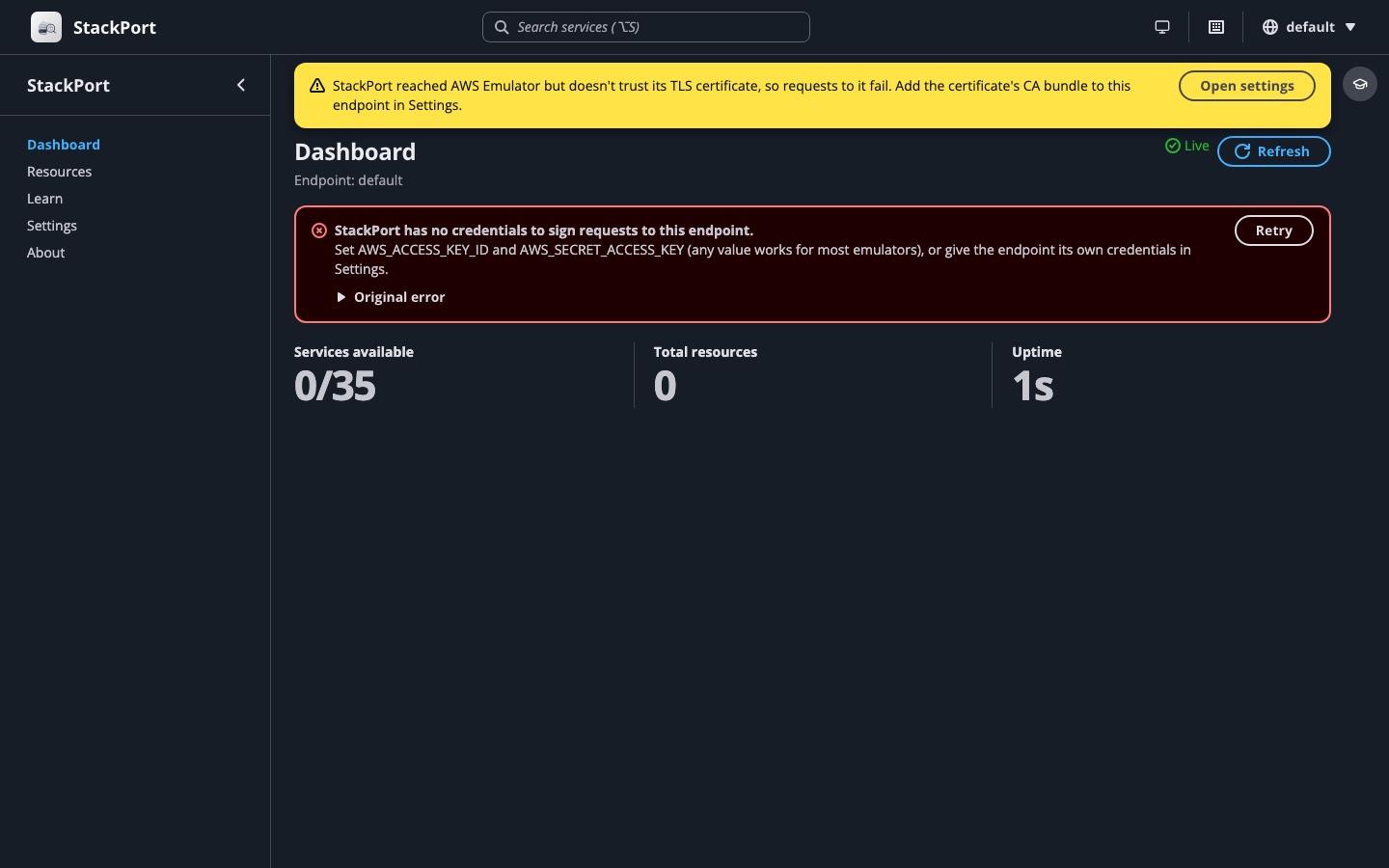 The two problems everyone hits first, each with what to do about it.
The emulator that doesn't trust browsers made me ask whether StackPort did
That code comment stuck with me. AWS Emulator refuses web pages from other sites because a developer visits a lot of web pages, and any of them can send requests to localhost. StackPort also listens on localhost. It also holds AWS credentials, sometimes for a real account. So what could a random web page do to it?
More than I'd like. A review of how StackPort handles requests found three problems that were there long before AWS Emulator:
- Any file on the machine could be read. The fallback that serves the web app for unknown paths would also serve
GET /%2Fetc%2Fhosts. - Other sites could change your resources. Browsers send "simple" cross-site requests without asking first, so a page you visited could purge a queue, terminate an instance or upload to S3 through StackPort. It could even hide your SQS messages with an
<img>tag, because receiving a message hides it for a while. - DNS rebinding got around the same-origin checks. A page could make its own domain resolve to
127.0.0.1and talk to StackPort as if it were StackPort's own page.
The fixes borrow the emulator's idea. StackPort refuses cross-site requests to its API and WebSocket based on Sec-Fetch-Site and Origin, only answers browsers that address it as localhost, an IP address or a host name you allow, listens on 127.0.0.1 by default, and keeps CORS off unless you turn it on. If you run StackPort, use v0.4.7 or later.
A new emulator is a free test suite
Then I went through StackPort screen by screen against AWS Emulator, and kept finding bugs that had nothing to do with it. Almost all of them also happened on the other emulators and on real AWS:
- IAM policy documents were always empty: trust policies, inline policies, all of them.
- EC2 counted reservations instead of instances.
- S3 downloads were about 14 times slower than they needed to be, and files with names outside Latin-1 didn't download at all.
- Log times were shown without a time zone.
They shipped together in v0.4.9, "fixes found testing against AWS Emulator". Every emulator exercises a console a little differently, which makes each new one a free test suite.
From "it works" to a console for it
Working wasn't the goal. AWS Emulator keeps everything in memory, keeps no request log, and its only admin route is a health check. A console can fill some of those gaps:
- An API Explorer for everything StackPort has no screen for. It lists every service botocore knows (436 in the version I tested), builds a form for each operation from botocore's own models, and copies the call as an AWS CLI command or boto3 code, with the emulator's setup included.
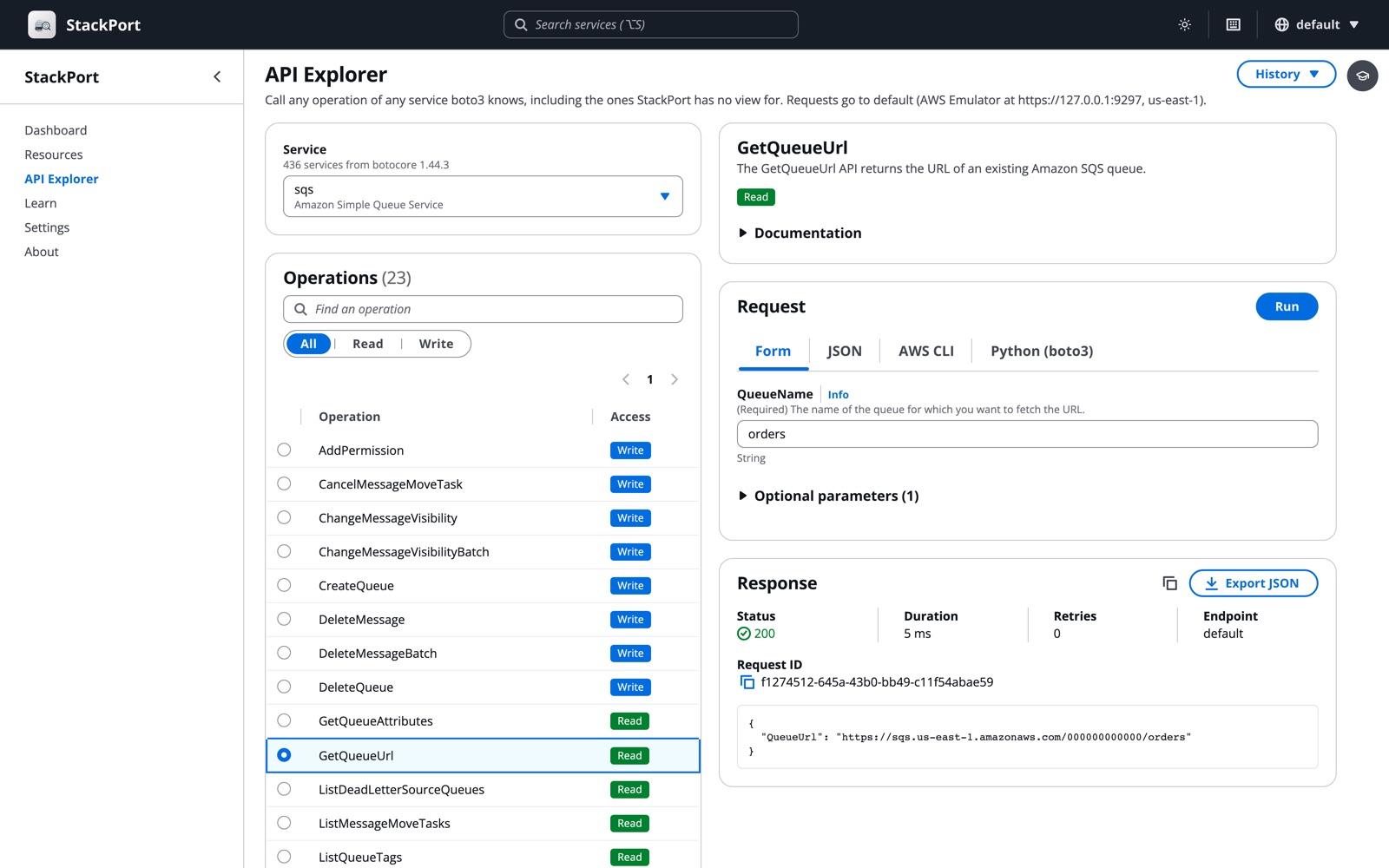 The API Explorer, pointed at AWS Emulator.
- Activity: the API calls CloudTrail recorded, newest first. AWS Emulator records about a dozen services.
- Try it for Lambda function URLs and API Gateway stages, which the emulator serves under paths like
/_aws/lambda-url/<id>/and/_aws/execute-api/<id>/<stage>/.
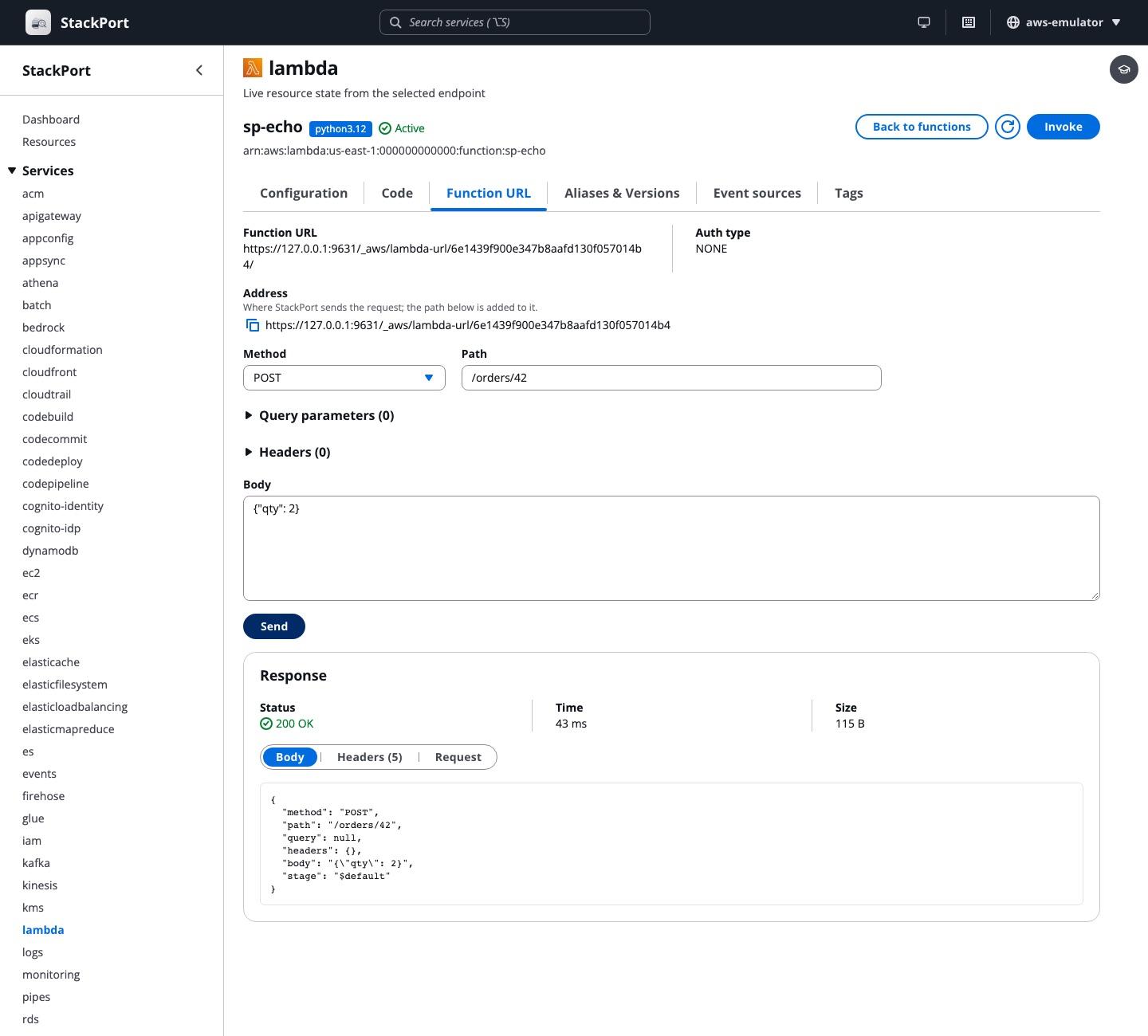 Try it: a POST to a Lambda function URL on AWS Emulator.
- Connection details for RDS and ElastiCache, which the emulator runs on real database ports: the address, and a
psqlorredis-clicommand to copy. - Limits next to the actions they affect: the 16 MiB cap next to S3 uploads, and the emulator's Python and Node.js Lambda runtimes next to Lambda invokes.
- 16 more services on the dashboard, for 51 in total.
Adding all those services surfaced one last bug. StackPort created a separate boto3 session for every client, and each endpoint's clients took about 500 MB. Sharing one session per set of credentials took memory from about 1 GB to about 330 MB with two endpoints, and the first dashboard load from 3.3 seconds to 0.4.
How to open AWS Emulator in a web UI
Start the emulator as in AWS's guide: the Linux package, or Docker on macOS and Windows, which shares ~/.aws/emulator with your machine. Then:
pip install stackport
AWS_ENDPOINT_URL=https://127.0.0.1:9297 stackport
# Open http://localhost:8080
StackPort finds the keys and the certificate on its own. To run both in Docker, there's a Compose file that builds the emulator from AWS's Dockerfile (AWS doesn't publish a prebuilt image) and seeds a few resources:
curl -O https://raw.githubusercontent.com/DaviReisVieira/stackport/main/examples/docker-compose.aws-emulator.yml
docker compose -f docker-compose.aws-emulator.yml up -d
# Open http://localhost:8080
StackPort is an independent open-source project, not affiliated with AWS. The same console works with MiniStack, its partner project, and with Floci, LocalStack, Moto and real AWS. There's more on stackport.cloud.
Quick answers
Does AWS Emulator have a UI? No. Its README says "It has no graphical interface." You use it through the AWS CLI or an SDK, or through a separate console such as StackPort.
Can I use the AWS Management Console with AWS Emulator? No. The AWS Console only works with AWS itself.
Why does my browser get "Requests a browser sends from another site are refused"? AWS Emulator refuses any request whose Origin or Sec-Fetch-Site header says it came from another site, before it even checks the signature. Send the request from a server, a CLI or a test, not from a web page.
How do I point boto3 or the AWS CLI at AWS Emulator? Set AWS_ENDPOINT_URL=https://127.0.0.1:9297, point AWS_CA_BUNDLE, AWS_SHARED_CREDENTIALS_FILE and AWS_CONFIG_FILE at the files in ~/.aws/emulator/9297/, and set AWS_DISABLE_HOST_PREFIX_INJECTION=true. AWS's guide has the full list.
Why did my keys stop working after I restarted the emulator? It creates new keys and a new certificate on every start. Read them again from ~/.aws/emulator/9297/, or start the emulator with --auth off for local work, which turns signature checks off.
Why does a call go to data-127.0.0.1 or sync-127.0.0.1? That's the SDK's host prefix for operations like Cloud Map's DiscoverInstances and Step Functions' StartSyncExecution. Set AWS_DISABLE_HOST_PREFIX_INJECTION=true.
Why does an S3 upload fail with 413? AWS Emulator refuses PutObject bodies of 16 MiB or more. Use a multipart upload. aws s3 cp already does that for large files.
Does AWS Emulator keep my data after a restart? No. It keeps everything in memory, so a restart starts from an empty account.
Thanks
To MiniStack's creator, for answering "StackPort ;)" before I knew anyone had asked.
Sources
- AWS, aws/aws-emulator: README, and the cross-site refusal in the source.
- AWS Emulator User Guide: Pointing your AWS SDK at AWS Emulator, Getting started with Docker, Security.
- Amazon, AWS Emulator announcement (November 11, 2026).
- Hacker News, AWS emulator (November 11, 2026).
- aws-emulator issues #23 (certificate names), #26 (browser requests) and #67 (16 MiB).
- StackPort, releases v0.4.7 to v0.4.11.